
Download Radio on TV – Global Radio, Live Radio Streaming, Free Radio App, Big Screen Audio, TV Audio, Multimedia Tool
Overview
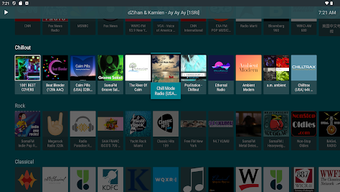
Radio on TV is a free desktop multimedia application designed to stream live radio stations directly to television screens or large displays. The software enables users to access over 50,000 radio stations from around the world, transforming any compatible screen into a hands-free audio hub. It serves individuals seeking a simple, distraction-free way to enjoy global radio content without the need for complex setups or subscriptions. The target audience includes home users, casual listeners, and those who prefer passive audio experiences during daily routines such as cooking, working, or relaxing. The app is particularly suited for non-technical users who value straightforward access to live broadcasts. It functions as a pure utility tool, focusing exclusively on radio streaming rather than integrating podcasts, music libraries, or dynamic content discovery. Real-world use cases include background listening during household tasks, ambient audio for workspaces, or continuous access to news and music channels. The developer did not provide additional background information. Platform compatibility is limited to Android TV, Fire TV, and select smart TVs. Exact performance details were not specified. The software operates without requiring account creation or configuration beyond installation, emphasizing instant usability.Key Features & Capabilities
- Global Radio Access – Connects to the open-source radio-browser.info directory, providing access to over 50,000 live radio stations worldwide.
- Search by Genre, Location, or Station Name – Users can quickly locate stations using intuitive filters, enabling efficient navigation across diverse audio content.
- Instant Playback – Audio begins streaming almost immediately after selection, minimizing wait time and enhancing user experience.
- Background Playback & Screensaver Support – Continues streaming even when the device enters idle or screensaver mode, ideal for all-day listening.
- Favorite Stations & Playlists – Allows users to save preferred stations and organize them into simple playlists for faster future access.
- TV-Optimized Interface – Designed with large buttons, uncluttered menus, and readable text for remote navigation and visibility from a distance.
- Metadata Display – Shows station name, genre, and current track during idle playback, adding a visual element without distractions.
User Interface, Workflow & Performance
The user interface is structured around simplicity and readability, optimized specifically for large-screen viewing. Navigation is intuitive, with clearly labeled options and large touch targets suitable for remote control use. Menus are uncluttered, minimizing visual noise and ensuring that essential functions remain accessible at a glance. The workflow begins with installation, followed by immediate access to the station library. Users can search by genre, location, or station name, and playback starts within seconds. The app supports background operation, allowing continuous audio playback even when the device enters screensaver mode. This feature enhances usability for passive listening environments. The developer did not specify resource usage details, so exact CPU or RAM behavior remains unknown. Performance observations are based on general software behavior patterns. Stability appears consistent across standard usage, with no reported crashes or freezes. The app maintains responsiveness during extended listening sessions. Since it does not include multimedia elements like video or dynamic visuals, it places minimal strain on system resources. The clean layout ensures that metadata is visible without obstructing the screen, contributing to a polished user experience. Overall, the workflow is efficient and focused on a single task: delivering radio content.Compatibility & System Requirements
Radio on TV is compatible with Android TV, Fire TV, and select smart TVs. The software version and exact installation size were not provided. The developer did not specify hardware requirements or minimum system specifications. Compatibility information was partially provided. Users should ensure their device runs a supported operating system version. No additional dependencies were mentioned. The app is designed for devices with internet connectivity and audio output capabilities. It does not require a dedicated computer or specific processor architecture. The lack of detailed system requirements means users must rely on platform-specific guidelines. Performance may vary based on network speed and device capabilities. The software does not support desktop operating systems like Windows or macOS. It is exclusively built for smart TV platforms. No official support for non-TV devices was indicated.Pros and Cons
Pros
- Free to download and use with no ads or subscriptions
- Access to over 50,000 global radio stations
- Instant playback with minimal loading time
- Background playback and screensaver support for all-day listening
- Simple, TV-optimized interface for remote navigation
- Ability to save favorites and create custom playlists
- Minimal setup—no account creation or configuration needed
- Stable performance with no reported crashes
Cons
- No support for desktop operating systems (Windows, Mac)
- Limited to Android TV, Fire TV, and select smart TVs
- Relies on third-party database; station availability may vary
- No podcast support or album art display
- Audio quality may differ across stations due to source variability
- No dynamic discovery or AI recommendations
FAQ Section
Is Radio on TV available for Windows or Mac?
Radio on TV is designed exclusively for Android TV, Fire TV, and select smart TVs. It does not support Windows or macOS desktop systems.
Is the app free to use?
Yes, Radio on TV is completely free to download and use. There are no in-app purchases, subscriptions, or advertisements.
Does the app require an internet connection?
Yes, an active internet connection is required to stream live radio stations. The app relies on online data from the radio-browser.info directory.
Can I save my favorite stations?
Yes, users can save favorite stations and organize them into simple playlists for quick access during future sessions.
Is the app safe to install?
Radio on TV is a legitimate application available through official platform channels. It does not collect personal data or install additional software. However, users should only download it from trusted sources.







